

Keyword Research for Beginners: A Step-by-Step Guide
You wrote a great guide on dog fence safety. You hit publish and waited. Nothing happened.
This is one of the most common frustrations for new bloggers, and it usually has one cause. You wrote about what you wanted to say, not what people were searching for. Keyword research fixes that gap.
This guide to keyword research for beginners walks you through the whole process using real examples from the dog fencing and pet safety niche. No jargon and no expensive software required.
Quick Answer: What Is Keyword Research?
Keyword research for beginners means finding the exact words people type into Google. List your core topics, generate ideas with free tools, check search volume and difficulty, analyze search intent, then pick low-competition, high-intent keywords and map each one to a single page.
Why Keyword Research Matters for Pet Safety Sites
Pet owners search when they’re worried. A dog just slipped the yard, a fence wire stopped working, or a collar isn’t giving the right correction.
These readers want a clear answer fast. If your page uses the same words they typed, Google can match you to them.
Good keyword research for beginners helps you:
- Find topics people actually search for
- Avoid writing for keywords you can’t realistically rank for
- Understand what a searcher wants before you write a single word
- Build a content plan instead of guessing week to week
Keyword Research for Beginners: 7 Steps
Step 1: Start With Seed Keywords
Seed keywords are short, broad phrases that describe your niche. They are the foundation of keyword research for beginners, so think of them as the roots of a tree.
For a dog fencing site, seeds might be:
- dog fence
- invisible fence
- wireless dog fence
- dog containment
- dog training collar
Write 5 to 10 of these in a spreadsheet. Don’t judge them yet. You just need a starting point.
Tip: Ask yourself what questions customers or friends ask you most often. Real questions make better seeds than anything you’d invent alone.

Step 2: Mine Google’s Free Suggestions
Google shows you what people search for, and it costs nothing. Type a seed keyword into the search bar and watch the autocomplete dropdown.
Then scroll down and collect these:
- Autocomplete suggestions as you type
- “People Also Ask” boxes in the results
- “Related searches” at the bottom of the page
Typing “invisible fence” might suggest phrases about cost, installation, or whether it works for stubborn dogs. Each suggestion is a topic real people are curious about.
Step 3: Expand Your List With a Keyword Tool
Once you have 20 to 30 ideas, use a tool to multiply them. Tools show estimated monthly searches and related phrases you’d never think of.
Good starting options:
- Google Keyword Planner: Free with a Google Ads account, and reliable for volume ranges.
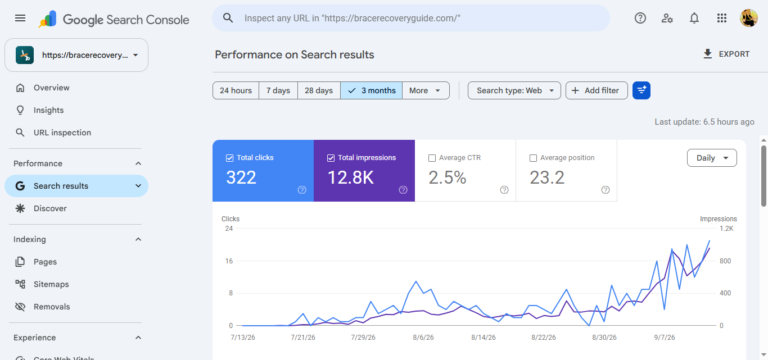
- Google Search Console: Free, and shows the queries your site already appears for.
- Ubersuggest or AnswerThePublic: Beginner-friendly, with limited free use.
- Semrush or Ahrefs: Paid, powerful, and best once you’re publishing regularly.
You don’t need all of them. For keyword research for beginners, one free tool and Google itself are enough to start.
Step 4: Check Volume and Difficulty
Now sort your list with two numbers.
- Search volume is roughly how many people search the phrase each month.
- Keyword difficulty is how hard it is to rank on page one.
Each tool calculates difficulty its own way. A “30” in one tool doesn’t equal a “30” in another. Compare keywords within the same tool, not across tools.
Beginners often chase high volume. That’s the biggest trap in keyword research for beginners. A keyword with 200 monthly searches that you can rank for beats one with 20,000 searches that you never will.
Step 5: Decode Search Intent
This step separates beginners from professionals. Search intent means why someone typed the phrase.
There are four main types:
| Intent | What the Searcher Wants | Example |
|---|---|---|
| Informational | To learn something | “how does an invisible fence work” |
| Commercial | To compare before buying | “best wireless dog fence” |
| Transactional | To buy now | “buy dog fence kit” |
| Navigational | To reach a specific site | “brand name login” |
Google the keyword yourself and look at page one. If every result is a how-to guide, a product page won’t rank there.
Match your content type to what Google already rewards.
Step 6: Check What Competitors Rank For
You don’t need to reinvent anything. Look at the top three results for a keyword and ask:
- How long and detailed are they?
- What subtopics do they cover?
- What do they miss or explain poorly?
That last question is your opportunity. If everyone explains how to install a fence but nobody covers troubleshooting a signal that keeps cutting out, write that.
Real-world tip: Small, specific sites often beat big retailers by answering one narrow question better than anyone else.

Step 7: Prioritize and Map Keywords to Pages
The last step turns research into a plan. Pick keywords with a good mix of these traits:
- Clear search intent you can satisfy
- Low to moderate difficulty
- Real relevance to your audience
- A natural fit with your existing content
Then assign one main keyword per page. Two pages targeting the same phrase compete against each other, which is called keyword cannibalization.
Track this in a simple spreadsheet. Every keyword research for beginners plan works better with columns for keyword, volume, difficulty, intent, and target URL.
Short-Tail vs. Long-Tail Keywords (With Real Examples)
Short-tail keywords are broad, and long-tail keywords are specific. Here’s how they look in the dog fencing niche:
- Short-tail: dog fence
- Mid-tail: invisible dog fence
- Long-tail: how to find a break in an invisible fence wire
- Long-tail: best wireless dog fence for a half-acre yard
The long-tail phrases have fewer searches but much clearer intent. Someone searching for a wire break is ready to fix it today.
For a newer site, long-tail keywords are where keyword research for beginners pays off first. If you want to see this in action, our guide on [Internal Link: how to find and repair a broken invisible fence wire] targets exactly this kind of specific problem.
Keyword Research for Beginners: Methods Compared
| Tool / Method | Key Highlight | Best For | Rating / Durability |
|---|---|---|---|
| Google Autocomplete & PAA | Free, shows real searcher language | Absolute beginners | ★★★★☆ Always current, no volume data |
| Google Keyword Planner | Free volume ranges from Google | Basic volume checks | ★★★☆☆ Reliable, but broad ranges |
| Google Search Console | Shows queries you already rank for | Existing sites | ★★★★★ Real data from your own site |
| Ubersuggest / AnswerThePublic | Simple interface, question ideas | Content brainstorming | ★★★☆☆ Good starter, limited free use |
| Semrush / Ahrefs | Deep difficulty and competitor data | Growing, serious sites | ★★★★★ Most complete, paid |
Pros and Cons of Free vs. Paid Keyword Tools
Which tools should you use for keyword research for beginners? Here’s an honest breakdown of free versus paid options.
Free Tools
Pros
- ✓ No financial risk while you learn
- ✓ Google’s own data reflects real searches
- ✓ Enough for a new site’s first 20 to 30 articles
Cons
- ✗ Limited data, such as vague volume ranges
- ✗ Weaker competitor analysis
- ✗ More manual work to organize results
Paid Tools
Pros
- ✓ Detailed difficulty scores and competitor insights
- ✓ Faster research, with keyword clusters built in
- ✓ Rank tracking to measure your progress
Cons
- ✗ Monthly cost adds up for hobby sites
- ✗ Can overwhelm beginners with data
- ✗ Numbers are estimates, not guarantees
Our take: Start free. Upgrade only when you’re publishing consistently and the limits start slowing you down.
Pros and Cons of Targeting Long-Tail Keywords
Pros
- ✓ Lower competition, so faster ranking potential
- ✓ Higher intent, so visitors are more likely to act
- ✓ Easier for new or small sites to win
Cons
- ✗ Lower individual traffic per page
- ✗ Requires publishing more articles
- ✗ Volume data is often missing or unreliable
Common Mistakes in Keyword Research for Beginners
Almost everyone makes a few of these early on. Here’s what to watch for.
- Chasing only high-volume keywords. You’ll compete with giants and stay invisible.
- Ignoring search intent. A guide won’t rank where Google shows products, and vice versa.
- Stuffing keywords. Write for humans first. Use the phrase naturally in the title, intro, and a few headings.
- Never revisiting your list. Search habits shift with seasons. Fence installation questions spike in spring, for example.
- Skipping your own data. Search Console often reveals easy wins you’re already close to ranking for.
A Worked Example: From Seed to Article
Here’s how keyword research for beginners looks when you apply all seven steps.
- Seed: “dog collar”
- Autocomplete idea: “dog collar for invisible fence”
- Tool check: moderate volume, low to medium difficulty
- Intent: commercial, since people are comparing options
- Competitor gap: top pages list products but don’t explain how to fit the collar correctly
- Decision: write a buyer’s guide with a proper fitting section
- Mapping: one page, one main keyword, linked to related content
Your finished article could then point readers to [Internal Link: best dog collars for invisible fences] for product comparisons. It could also link to [Internal Link: how invisible fences work] for readers who are still learning the basics.
How Long Until Keyword Research Pays Off?
Be patient with yourself. New pages commonly take several months to gain traction, and results vary by site age and competition.
What you can control is consistency. Publish keyword-informed content regularly, update older articles, and check Search Console monthly.
Frequently Asked Questions
What is the easiest way to start keyword research for beginners?
Type a topic into Google and collect the autocomplete suggestions, “People Also Ask” questions, and related searches. Paste them into a spreadsheet, then check volume and difficulty with a free tool like Google Keyword Planner.
How many keywords should I target per article?
Focus on one primary keyword and a handful of closely related secondary phrases. This keeps the page focused and prevents it from competing with your other articles.
Are free keyword research tools good enough?
Yes, for beginners. Google Autocomplete, Keyword Planner, and Search Console cover most early needs. Paid tools become worthwhile once you need deeper competitor analysis and rank tracking.
What is a good keyword difficulty for a new website?
Start with keywords your tool rates as low difficulty. Scales differ between tools, so compare options within one tool. Then check page one yourself. If smaller sites appear there, you have a realistic chance.
Final Thoughts
Keyword research for beginners isn’t about tricking Google. It’s about understanding the worried, curious, or ready-to-buy person on the other side of the search bar.
Start small. Pick five seed keywords, find ten long-tail phrases, and write one genuinely helpful article this week. Then repeat.
Over time, that steady habit builds a site that answers real questions, which is what good SEO rewards.




One Comment